

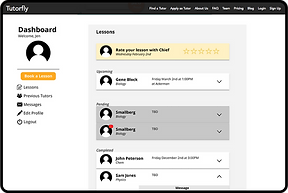
.png)
TUTORFLY
UX INTERN
INTERNSHIP
Duration: January 2018 - June 2018
Team: 10+ UCLA Students
Role: User Experience Design Intern, Front-End Developer
PROJECT OVERVIEW
Problem:
As a startup, Tutorfly needed the UX interns to go through the website to test the ease of usability of the website.
Users:
Tutorfly students, parents of Tutorfly students, college students
What we did:
-
Conducted cognitive walkthrough with Tutorfly students, parents and other college students to understand the pros and cons of the website
-
Created low fidelity mock ups as a way to present potential changes we could make on the website to address the issues that came up.
-
Link to the Project Prototype
What we learned
About Tutorfly
Tutorfly is a start up tutoring service that founded at UCLA. It sets itself apart from other tutoring service as their tutors have recently completed and excelled in the same course with the same professor/teacher that their students are taking. Consequently, tutors are better able to help their students as they understand the intricacies of taking the course with a specific professor.
Client's Needs
As a recent startup, Tutorfly did not focus too much on user experience of the site. They wanted the UX interns to go through the entire Tutorfly website to see what "works" and what needs to be improved so that the users would have an easier time navigating through the site.
Scope of the Project
The UX team was tasked to go through the entire Tutorfly website and determine which area of the site needed change to make the user experience more fluid. After creating the comprehensive review of the entire site, we were tasked with making as many of the changes we recommended for the rest of the duration of the internship.
Along with the UX tasks, we were also assigned with fulfilling any design needs (i.e. promotional banners and flyers).
IDENTIFYING USER NEEDS
Page Evaluations
Each UX intern went through the entire Tutorfly website and noted the Positives, Negatives and Changes needed on each page. In addition, we each did a cognitive walkthrough as a student, parent, and as a tutor to see if questions that each user would have would get addressed on the appropriate page.

User Surveys
After creating our own predictions of user pain points, we conducted a user interview with students and parents to get a better idea of what are the actual pain points users are facing.
-
We used google forms to collect the interview data.
-
The interview consisted of:
-
Initial view of Tutorfly
-
Review of each page on Tutorfly
-
Cognitive walkthroughs
-
We used the user surveys to determine how to prioritize different changes we needed to make.
Needs of the Website
After our own eval and the user interviews, the main needs the UX team decided to focus on were:
-
Clarifying the purpose of Tutorfly.
-
Clarifying the next step of action users would need to take after getting to the landing page.
-
Reorganizing and redesigning the Dashboard to make it easier to use.
-
Adding in Testimonials to increase the reliability of the service.
We began working on the simple changes and eventually we began learning JavaScript, git and React so that we could also implement intensive changes.
IMPLEMENTATION
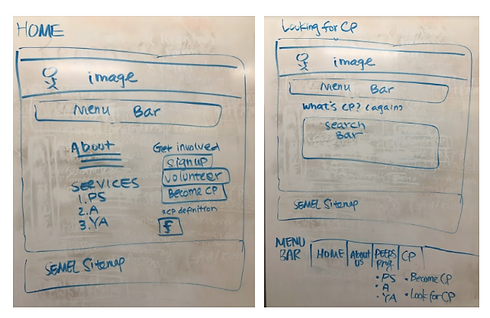
Simple Edits
Some of the simple edits included:
-
Added the Tutorfly icon on the top left for easier access back to the homepage.
-
Changed the wording on the "How to get started" section, to clarify the steps students would need to take.
-
Updated the information on the footer and added in icons in the Share section for easier use.

Intensive Changes
Some of the main intensive changes included:
-
Added an action button, "Find a tutor now" so that it would direct the users to the next step if they were unsure about what to do.
-
Included "Why Tutorfly" section on the landing page to explicitly state what set apart Tutorfly from other tutoring services.
-
Created a testimonial section on the landing page to reassure the students and parents on the reliability of the service and of the tutors.
FINAL DELIVERABLES
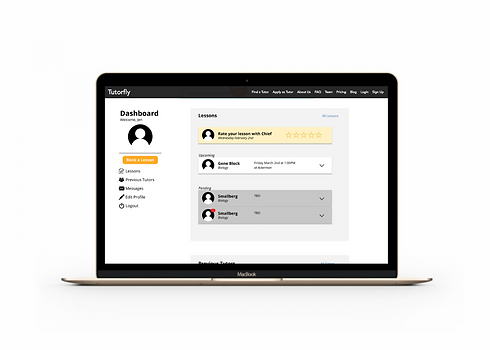
Dashboard Prototype
Out of all the features on Tutorfly, the Dashboard needed the most work as it was not intuitive to use. It was vital to make the dashboard user friendly as all of the communication between a tutor and student would occur here.
-
Based on cognitive walkthrough results from the user interviews, I created a mockup of the dashboard.
-
Some of the main problems were:
-
It was difficult to find where new messages were from tutors, there wasn't a consolidated place for all the new messages to show.
-
The Lessons and Tutor tabs, and the subtabs within it wasn't intuitive to use.
-
-
I used figma and invision to implement the dashboard prototype.
-
Click here for the interactive prototype.
-
-
I began working with the programmers to start implementing these changes.
Website Mock up
Click to zoom
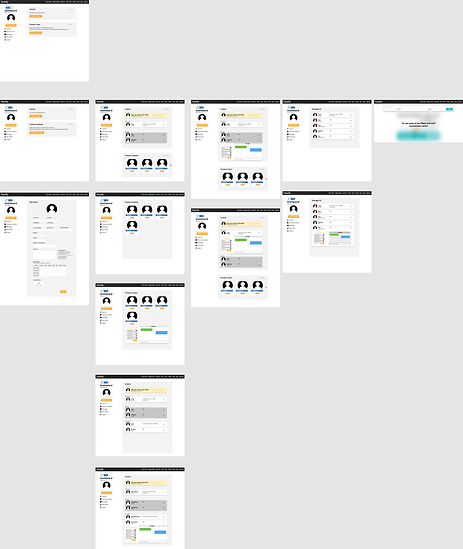
User Testing
We were unable to do user testing with the changes we made, as the dashboard was still incomplete and it was difficult to see the result of the testimonial, "Why Tutorfly" and action button changes as the site traffic was low to begin with.
LEARNINGS
Need of flexibility in a small team
-
As the team was pretty small, each team member had to put on multiple hats. In order to get testimonials, the UX team joined in with the business team to contact parents and students to gain all the necessary information. In addition, to implement the changes on the website, we had to not only work with the programmers but we also learned React, git, and JS to implement some of the changes ourselves. Although we were first tasked to just guide the programmers during change implementation, programmers were often swamped with backend bugs so we had to implement the changes in the meantime.
Patience is key
-
Learning React, git and JS was difficult and in the beginning, it felt like I would not be able to grasp it. However, after struggling with it, researching and asking the programmers for advice, I was able to learn and implement website changes on my own.